Introduction
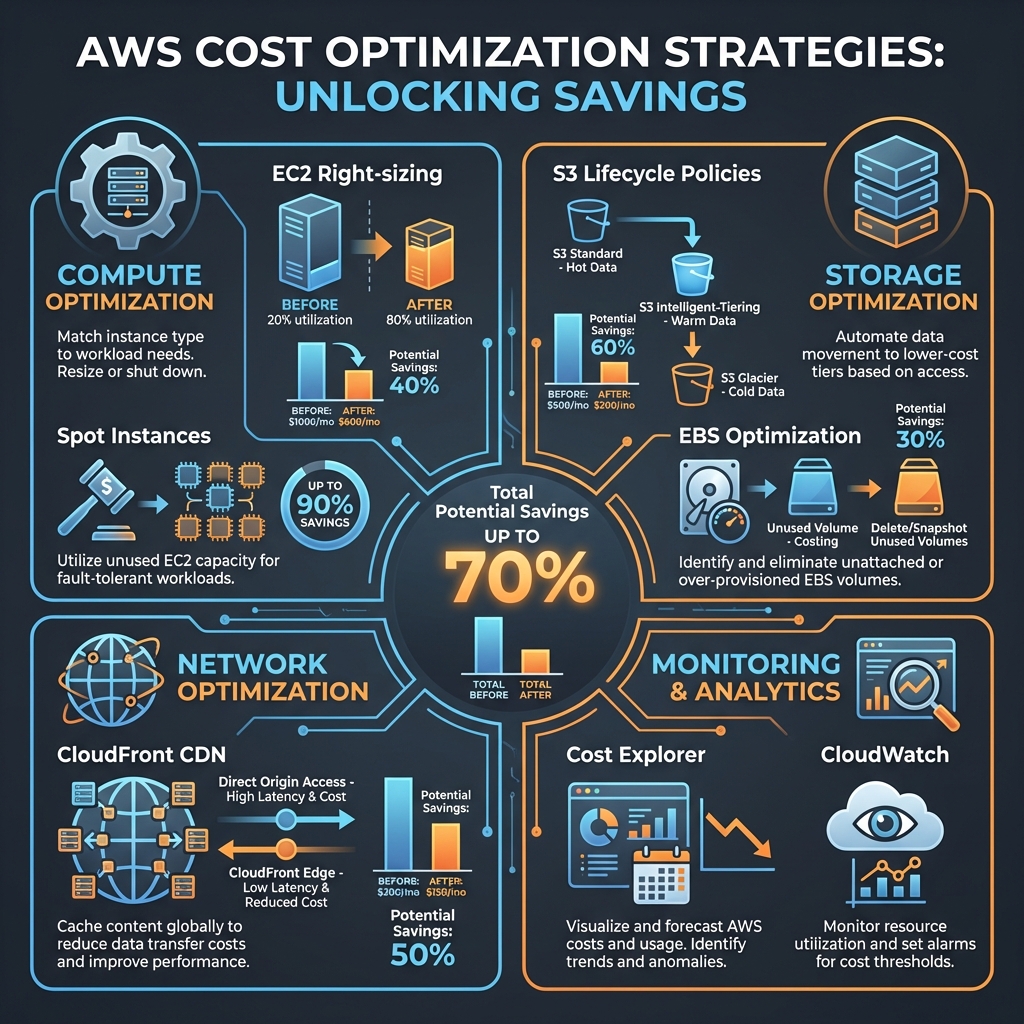
Cloud costs can spiral out of control quickly, especially as your infrastructure grows. We've seen companies reduce their AWS bills by 40-70% through systematic optimization without compromising on performance, reliability, or velocity.
This guide walks through battle-tested strategies across compute, storage, network, and monitoring—complete with actionable implementation steps.
Cost Optimization Framework
1. Compute Optimization
EC2 Right-Sizing
The single biggest waste in most AWS environments is over-provisioned EC2 instances. Right-sizing can reduce compute costs by 30-50% immediately.
# Use AWS CloudWatch to analyze actual utilization
aws cloudwatch get-metric-statistics \
  --namespace AWS/EC2 \
  --metric-name CPUUtilization \
  --dimensions Name=InstanceId,Value=i-1234567890abcdef0 \
  --start-time 2026-01-01T00:00:00Z \
  --end-time 2026-01-15T00:00:00Z \
  --period 3600 \
  --statistics Average,Maximum
Implementation Steps:
- Baseline Analysis: Review 2-4 weeks of CPU, memory, and network utilization
- Identify Candidates: Instances with <20% average CPU or <40% memory are prime targets
- Gradual Migration: Start with dev/staging, then production during low-traffic windows
- Performance Testing: Validate response times and throughput after each change
💡 Pro Tip
Use AWS Compute Optimizer for automated right-sizing recommendations. It analyzes 14 days of metrics and provides instance type suggestions with projected savings.
Spot Instances and Savings Plans
Spot instances offer up to 90% discounts for fault-tolerant workloads. Combined with Savings Plans, you can achieve massive savings.
# Terraform example for mixed instance policy
resource "aws_autoscaling_group" "app" {
  name = "app-asg"

  mixed_instances_policy {
    instances_distribution {
      on_demand_base_capacity              = 2
      on_demand_percentage_above_base      = 20
      spot_allocation_strategy             = "capacity-optimized"
      spot_instance_pools                  = 4
    }

    launch_template {
      launch_template_specification {
        launch_template_id = aws_launch_template.app.id
        version           = "$Latest"
      }

      override {
        instance_type = "t3.large"
      }
      override {
        instance_type = "t3a.large"
      }
      override {
        instance_type = "t2.large"
      }
    }
  }
}
Spot Instance Best Practices:
- Diversify: Use multiple instance types and availability zones
- Graceful Handling: Implement spot interruption notices (2-minute warning)
- Stateless Workloads: Best for batch processing, CI/CD, data processing
- Capacity Optimized: Use capacity-optimized allocation strategy
2. Storage Optimization
S3 Lifecycle Policies
Intelligent tiering and lifecycle management can reduce S3 costs by 50-70% for most workloads.
{
  "Rules": [
    {
      "Id": "intelligent-tiering-rule",
      "Status": "Enabled",
      "Filter": {
        "Prefix": "data/"
      },
      "Transitions": [
        {
          "Days": 30,
          "StorageClass": "STANDARD_IA"
        },
        {
          "Days": 90,
          "StorageClass": "INTELLIGENT_TIERING"
        },
        {
          "Days": 180,
          "StorageClass": "GLACIER_IR"
        },
        {
          "Days": 365,
          "StorageClass": "DEEP_ARCHIVE"
        }
      ],
      "NoncurrentVersionTransitions": [
        {
          "NoncurrentDays": 30,
          "StorageClass": "GLACIER"
        }
      ],
      "Expiration": {
        "Days": 730
      }
    }
  ]
}
Storage Class Selection Guide:
- Standard: Frequently accessed data (>1x/month)
- Standard-IA: Infrequent access (1x/quarter), save 40%
- Intelligent-Tiering: Unknown or changing patterns, automatic optimization
- Glacier Instant Retrieval: Archive with instant access, save 68%
- Deep Archive: Long-term retention (7-10 years), save 95%
EBS Optimization
Unused and over-provisioned EBS volumes are a common source of waste.
# Find unattached EBS volumes
aws ec2 describe-volumes \
  --filters Name=status,Values=available \
  --query 'Volumes[*].[VolumeId,Size,VolumeType,CreateTime]' \
  --output table

# Find snapshots older than 90 days
aws ec2 describe-snapshots \
  --owner-ids self \
  --query 'Snapshots[?StartTime<=`2025-10-15`].[SnapshotId,VolumeSize,StartTime]' \
  --output table
EBS Cost Reduction Tactics:
- Delete Unattached Volumes: Automated cleanup with Lambda
- Snapshot Management: Retain only necessary snapshots, use incremental backups
- gp3 Migration: Migrate from gp2 to gp3 for 20% cost reduction + better performance
- Volume Right-Sizing: Reduce over-provisioned volume sizes
3. Network Optimization
Data Transfer Costs
Data transfer, especially across regions and to the internet, can be surprisingly expensive.
# CloudFront distribution with optimal settings
resource "aws_cloudfront_distribution" "cdn" {
  enabled             = true
  price_class         = "PriceClass_100"  # US, Canada, Europe

  origin {
    domain_name = aws_s3_bucket.content.bucket_regional_domain_name
    origin_id   = "S3-content"

    s3_origin_config {
      origin_access_identity = aws_cloudfront_origin_access_identity.oai.cloudfront_access_identity_path
    }
  }

  default_cache_behavior {
    compress               = true  # Enable compression
    viewer_protocol_policy = "redirect-to-https"
    allowed_methods        = ["GET", "HEAD", "OPTIONS"]
    cached_methods         = ["GET", "HEAD"]
    target_origin_id       = "S3-content"

    forwarded_values {
      query_string = false
      cookies {
        forward = "none"
      }
    }

    min_ttl     = 0
    default_ttl = 86400   # 1 day
    max_ttl     = 31536000 # 1 year
  }
}
Network Cost Strategies:
- CloudFront CDN: Reduce origin requests by 80-95%, cheaper data transfer rates
- S3 Transfer Acceleration: For global uploads, can reduce costs via edge locations
- VPC Endpoints: Avoid NAT Gateway charges for AWS service communication
- Regional Consolidation: Minimize cross-region data transfer
4. Monitoring & Continuous Optimization
AWS Cost Explorer
Automated cost monitoring is essential for catching cost creep early.
import boto3
from datetime import datetime, timedelta

ce = boto3.client('ce')

def get_cost_trend(days=30):
    end = datetime.now().date()
    start = end - timedelta(days=days)

    response = ce.get_cost_and_usage(
        TimePeriod={
            'Start': str(start),
            'End': str(end)
        },
        Granularity='DAILY',
        Metrics=['UnblendedCost'],
        GroupBy=[
            {'Type': 'DIMENSION', 'Key': 'SERVICE'},
            {'Type': 'TAG', 'Key': 'Environment'}
        ]
    )

    return response['ResultsByTime']

# Set up cost anomaly detection
def create_anomaly_monitor():
    response = ce.create_anomaly_monitor(
        AnomalyMonitor={
            'MonitorName': 'Production Cost Monitor',
            'MonitorType': 'DIMENSIONAL',
            'MonitorDimension': 'SERVICE'
        }
    )

    return response['MonitorArn']
CloudWatch Alarms
# Terraform CloudWatch alarm for cost threshold
resource "aws_cloudwatch_metric_alarm" "billing_alarm" {
  alarm_name          = "monthly-billing-alarm"
  comparison_operator = "GreaterThanThreshold"
  evaluation_periods  = "1"
  metric_name         = "EstimatedCharges"
  namespace           = "AWS/Billing"
  period             = "21600"  # 6 hours
  statistic          = "Maximum"
  threshold          = "5000"   # $5000 threshold
  alarm_description  = "Alert when monthly charges exceed $5000"
  alarm_actions      = [aws_sns_topic.billing_alerts.arn]

  dimensions = {
    Currency = "USD"
  }
}
Implementation Roadmap
Month 1: Quick Wins
- Delete unattached EBS volumes and old snapshots
- Enable S3 Intelligent-Tiering
- Set up Cost Explorer and billing alarms
- Identify and stop unused EC2 instances
Month 2: Systematic Optimization
- Right-size EC2 instances based on utilization data
- Implement Savings Plans for steady-state workloads
- Migrate gp2 to gp3 EBS volumes
- Deploy CloudFront for static content
Month 3: Advanced Strategies
- Introduce Spot instances for batch workloads
- Implement VPC endpoints for AWS services
- Set up automated cost anomaly detection
- Review and optimize Lambda memory allocations
Measuring Success
Track these KPIs to measure optimization effectiveness:
- Cost Per Customer: Total AWS cost / active customers
- Cost Per Transaction: Total AWS cost / transaction volume
- Waste Percentage: Unused resources / total resources
- Coverage Ratio: Reserved/Savings Plan coverage for steady workloads
- Month-over-Month Trend: Cost change adjusted for business growth
Conclusion
AWS cost optimization is not a one-time effort—it's a continuous practice. The strategies outlined here can reduce your cloud spend by 40-70% while maintaining or even improving performance.
Start with quick wins, measure everything, and build cost awareness into your engineering culture. Your CFO will thank you.
Key Takeaways
- Right-size EC2 instances based on actual utilization data, not assumptions
- Use Spot instances for fault-tolerant workloads to save up to 90%
- Implement S3 lifecycle policies to automatically tier data to cheaper storage
- Deploy CloudFront CDN to reduce data transfer costs and improve performance
- Set up cost monitoring and anomaly detection to catch issues early
- Build a culture of cost awareness across engineering teams